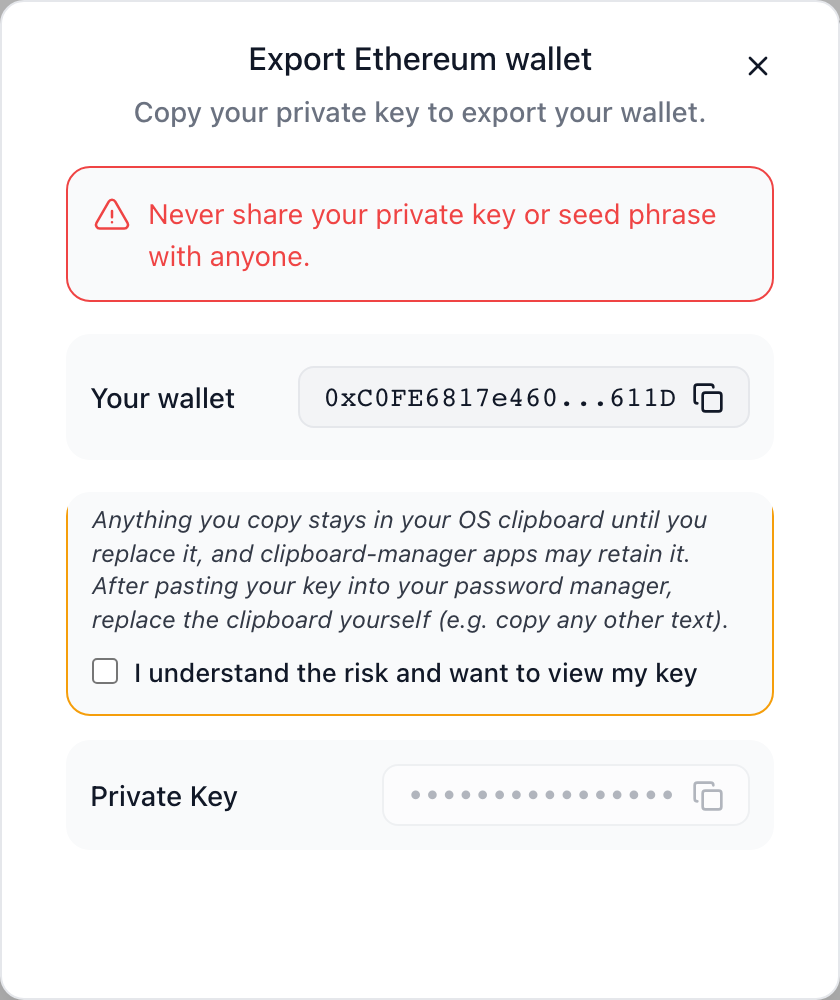
# Export a Wallet
**MoonPay Wallets enables your users to export the private key for their embedded wallet**. This allows them to use their embedded wallet address with another wallet client, such as MetaMask or Phantom, or to back up their wallet for recovery purposes.
Exporting private keys is a sensitive operation. Once exported, the private key gives complete control over the wallet and all its assets. Users should be educated about proper key storage and security practices.
## Overview
When users export their wallet, they receive:
* **Full private key** for their embedded wallet
* **Complete control** over their wallet, even outside your application
* **Ability to import** into other wallet clients (MetaMask, Phantom, etc.)
* **Self-custody** of their assets
When your user exports their embedded wallet, their private key is assembled in a secure environment separate from your app. This means **neither you nor MoonPay Wallets can ever access your user's full private key**. Your user is the only party that can ever access it.
## React SDK
MoonPay Wallets provides a simple hook-based API for wallet export in React applications.
To enable wallet export for Ethereum wallets, use the `useExportKey` hook from `@moon-x/react-sdk/ethereum`:
### Basic Usage
```tsx
import { useMoonX } from '@moon-x/react-sdk';
import { useExportKey } from '@moon-x/react-sdk/ethereum';
function ExportWalletButton() {
const { user, isAuthenticated, ready } = useMoonX();
const { exportKey } = useExportKey();
const handleExport = async () => {
if (!user?.wallets?.[0]) {
alert('No wallet found');
return;
}
try {
await exportKey({
wallet: user.wallets[0]
});
console.log('Export initiated');
} catch (error) {
console.error('Export failed:', error);
}
};
// Check if user has a wallet
const hasWallet = user?.wallets?.[0] !== undefined;
return (
);
}
```
### With Custom UI Configuration
You can customize the export modal's appearance by passing a `uiConfig` object:
```tsx
import { useMoonX } from '@moon-x/react-sdk';
import { useExportKey } from '@moon-x/react-sdk/ethereum';
function ExportWalletButton() {
const { user } = useMoonX();
const { exportKey } = useExportKey();
const handleExport = async () => {
if (!user?.wallets?.[0]) return;
try {
await exportKey({
wallet: user.wallets[0],
uiConfig: {
title: 'Backup Your Wallet',
privateKeyDescription: 'Your private key provides complete control over this wallet. Store it securely.',
neverShareDescription: 'Never share your private key with anyone, including MoonPay Wallets support.',
loadingExportOptionsText: 'Preparing secure export...'
}
});
} catch (error) {
console.error('Export cancelled or failed:', error);
}
};
return (
);
}
```
### Complete Example
Here's a complete example with proper validation and error handling:
```tsx
'use client';
import { useMoonX } from '@moon-x/react-sdk';
import { useExportKey } from '@moon-x/react-sdk/ethereum';
import { useState } from 'react';
export default function WalletExportSection() {
const { user, isAuthenticated, ready } = useMoonX();
const { exportKey } = useExportKey();
const [isExporting, setIsExporting] = useState(false);
const [error, setError] = useState(null);
const handleExport = async () => {
// Clear previous errors
setError(null);
// Validate user has a wallet
if (!user?.wallets?.[0]) {
setError('No wallet found. Please create a wallet first.');
return;
}
// Confirm user intent
const confirmed = window.confirm(
'WARNING: Your private key gives complete control of your wallet. ' +
'Make sure you store it in a secure location. Continue?'
);
if (!confirmed) return;
setIsExporting(true);
try {
await exportKey({
wallet: user.wallets[0],
uiConfig: {
title: 'Export Private Key',
privateKeyDescription: 'This key provides full access to your wallet and funds. Keep it safe and offline.',
neverShareDescription: 'Never share this key. MoonPay Wallets will never ask for it.',
loadingExportOptionsText: 'Loading secure export options...'
}
});
alert('Private key export initiated. Follow the instructions on screen.');
} catch (err: any) {
console.error('Export error:', err);
setError(err.message || 'Failed to export wallet. Please try again.');
} finally {
setIsExporting(false);
}
};
// Loading state
if (!ready) {
return
Loading...
;
}
// Not authenticated
if (!isAuthenticated || !user) {
return (
Please sign in to export your wallet
);
}
// No wallet
if (!user.wallets?.[0]) {
return (
No wallet found. Create a wallet to enable export.
);
}
return (
Export Wallet
⚠️ Exporting your private key gives you complete control of your wallet,
but also complete responsibility for its security.
{error && (
{error}
)}
What you'll receive:
Your wallet's private key
Instructions for importing into MetaMask
Security best practices
);
}
```
To enable wallet export for Solana wallets, use the `useExportKey` hook from `@moon-x/react-sdk/solana`:
### Basic Usage
```tsx
import { useMoonX } from '@moon-x/react-sdk';
import { useExportKey } from '@moon-x/react-sdk/solana';
function ExportWalletButton() {
const { user, isAuthenticated, ready } = useMoonX();
const { exportKey } = useExportKey();
const handleExport = async () => {
if (!user?.wallets?.[0]) {
alert('No wallet found');
return;
}
try {
await exportKey({
wallet: user.wallets[0]
});
console.log('Export initiated');
} catch (error) {
console.error('Export failed:', error);
}
};
// Check if user has a wallet
const hasWallet = user?.wallets?.[0] !== undefined;
return (
);
}
```
### With Custom UI Configuration
```tsx
import { useMoonX } from '@moon-x/react-sdk';
import { useExportKey } from '@moon-x/react-sdk/solana';
function ExportWalletButton() {
const { user } = useMoonX();
const { exportKey } = useExportKey();
const handleExport = async () => {
if (!user?.wallets?.[0]) return;
try {
await exportKey({
wallet: user.wallets[0],
uiConfig: {
title: 'Backup Your Solana Wallet',
privateKeyDescription: 'Your private key provides complete control over this Solana wallet. Store it securely.',
neverShareDescription: 'Never share your private key with anyone, including MoonPay Wallets support.',
loadingExportOptionsText: 'Preparing secure export...'
}
});
} catch (error) {
console.error('Export cancelled or failed:', error);
}
};
return (
);
}
```
### Complete Example
```tsx
'use client';
import { useMoonX } from '@moon-x/react-sdk';
import { useExportKey } from '@moon-x/react-sdk/solana';
import { useState } from 'react';
export default function SolanaWalletExport() {
const { user, isAuthenticated, ready } = useMoonX();
const { exportKey } = useExportKey();
const [isExporting, setIsExporting] = useState(false);
const handleExport = async () => {
if (!user?.wallets?.[0]) return;
const confirmed = window.confirm(
'Your private key gives complete control of your Solana wallet. ' +
'Store it securely. Continue?'
);
if (!confirmed) return;
setIsExporting(true);
try {
await exportKey({
wallet: user.wallets[0],
uiConfig: {
title: 'Export Solana Wallet',
privateKeyDescription: 'Use this key to import your wallet into Phantom or other Solana wallets.',
neverShareDescription: 'Keep this key private. Anyone with it can access your funds.',
}
});
} catch (error) {
console.error('Export failed:', error);
} finally {
setIsExporting(false);
}
};
if (!ready || !isAuthenticated || !user?.wallets?.[0]) {
return null;
}
return (
);
}
```
Use the Bitcoin subpath for Taproot, Native SegWit, or Legacy wallets:
```tsx
import { useWallets, useExportKey } from '@moon-x/react-sdk/bitcoin';
function ExportBitcoinWallets() {
const { wallets } = useWallets();
const { exportKey } = useExportKey();
return wallets.map((wallet) => (
));
}
```
The secure export modal reveals a compressed mainnet WIF key. It should identify the wallet as Bitcoin and show the wallet's exact address and type.
## Bitcoin wallet portability
Bitcoin WIF does not record whether a public key should be used as Taproot (`bc1p`), Native SegWit (`bc1q`), or Legacy P2PKH (`1...`). The receiving client chooses the script type during import.
| MoonPay Wallets export | What an external wallet must import |
| --- | --- |
| Taproot (`p2tr`, `bc1p`) | The WIF as a Taproot or P2TR single-key wallet |
| Native SegWit (`p2wpkh`, `bc1q`) | The WIF as a Native SegWit or P2WPKH single-key wallet |
| Legacy (`p2pkh`, `1...`) | The WIF as a Legacy or P2PKH single-key wallet |
An external wallet accepting the WIF is not enough to prove recovery. Compare the entire imported address with the address in MoonPay Wallets. If they differ, the client is monitoring a different Bitcoin output script and will not show or spend the original address's UTXOs.
Phantom supports [Native SegWit and Taproot addresses](https://help.phantom.com/hc/en-us/articles/21872962238355-What-Bitcoin-addresses-does-Phantom-support), but a [private-key import restores one address on one network](https://help.phantom.com/hc/en-us/articles/15079894392851-Restore-a-wallet-in-Phantom). A Taproot WIF that Phantom displays as `bc1q` has been imported as Native SegWit, not as the original Taproot address in MoonPay Wallets.
For the full explanation, see [Bitcoin Overview and Wallet Types](/wallets/using-wallets/bitcoin/overview).
## UI Configuration Options
The `exportKey` method accepts an optional `uiConfig` object to customize the export modal:
Custom title displayed at the top of the export modal.
**Example:**
```tsx
uiConfig: {
title: 'Backup Your Wallet'
}
```
Description explaining what the private key is and its importance.
**Example:**
```tsx
uiConfig: {
privateKeyDescription: 'Your private key gives full control of your wallet. Store it securely offline.'
}
```
Warning message emphasizing that the key should never be shared.
**Example:**
```tsx
uiConfig: {
neverShareDescription: 'Never share your private key with anyone, including MoonPay Wallets support.'
}
```
Loading text displayed while the export modal is initializing.
**Example:**
```tsx
uiConfig: {
loadingExportOptionsText: 'Preparing secure export...'
}
```
Description for HD (Hierarchical Deterministic) wallet exports.
**Example:**
```tsx
uiConfig: {
hdDescription: 'Your seed phrase can restore all wallets derived from this account.'
}
```
URL to your application's logo to display in the export modal.
**Example:**
```tsx
uiConfig: {
logoUrl: 'https://myapp.com/logo.png'
}
```
## Common Use Cases
### Wallet Backup
Allow users to back up their wallet for recovery:
```tsx
import { useMoonX } from '@moon-x/react-sdk';
import { useExportKey } from '@moon-x/react-sdk/ethereum';
function BackupWalletButton() {
const { user } = useMoonX();
const { exportKey } = useExportKey();
const handleBackup = async () => {
if (!user?.wallets?.[0]) return;
await exportKey({
wallet: user.wallets[0],
uiConfig: {
title: 'Backup Your Wallet',
privateKeyDescription: 'Save your private key in a secure location for wallet recovery.',
neverShareDescription: 'Store this key offline. Never share it with anyone.'
}
});
};
return (
);
}
```
## Best Practices
Use confirmation dialogs before exporting to ensure users understand the implications:
```tsx
const confirmed = window.confirm(
'WARNING: Your private key gives complete control of your wallet. ' +
'Make sure you store it securely. Continue?'
);
if (!confirmed) return;
```
Provide clear warnings and best practices:
```tsx
Security Best Practices:
Store your private key in a password manager or offline
Never share your key with anyone
Be cautious of phishing attempts
Consider using a hardware wallet for large amounts
```
Always check that a wallet exists before attempting export:
```tsx
if (!user?.wallets?.[0]) {
setError('No wallet found. Create a wallet first.');
return;
}
```
Provide clear error messages and recovery options:
```tsx
try {
await exportKey({ wallet: user.wallets[0] });
} catch (error: any) {
if (error.code === 'USER_CANCELLED') {
console.log('User cancelled export');
} else {
setError('Export failed. Please try again or contact support.');
}
}
```
Your application should never log, store, or transmit exported private keys:
```tsx
// ❌ NEVER DO THIS
const key = await exportKey({ wallet: user.wallets[0] });
console.log('Private key:', key); // NEVER LOG KEYS
localStorage.setItem('key', key); // NEVER STORE KEYS
await fetch('/api/save-key', { body: key }); // NEVER SEND KEYS
// ✅ CORRECT - Just trigger the export UI
await exportKey({ wallet: user.wallets[0] });
// MoonPay Wallets handles key display securely
```
Use `uiConfig` to match your application's branding:
```tsx
uiConfig: {
title: 'Backup Your Wallet',
logoUrl: 'https://myapp.com/logo.png',
privateKeyDescription: 'Custom message for your users...'
}
```
## Security Considerations
**Private key export is a high-risk operation.** Ensure your users understand:
* Anyone with the private key has **complete control** of the wallet
* Lost private keys **cannot be recovered**
* Stolen private keys can result in **permanent loss of funds**
* Private keys should **never be shared** with anyone
### What happens during export
1. **User initiates export** through your application
2. **MoonPay Wallets opens secure modal** in an isolated environment
3. **Private key is assembled** client-side in a separate origin
4. **User copies key** directly from the secure modal
5. **No logging or storage** occurs in your application or the MoonPay Wallets servers
### Security features
* **Isolated origin**: Keys are displayed in a separate security context
* **No server access**: Neither your app nor MoonPay Wallets can access the full key
* **User-only access**: Only the user can view their exported key
* **No automatic storage**: Keys are never automatically saved anywhere
* **Ephemeral display**: Keys are only shown during the export flow
## Troubleshooting
Check these conditions:
* SDK is ready (`ready === true`)
* User is authenticated (`isAuthenticated === true`)
* User has a wallet (`user?.wallets?.[0] !== undefined`)
```tsx
console.log('SDK ready:', ready);
console.log('Is authenticated:', isAuthenticated);
console.log('Has wallet:', !!user?.wallets?.[0]);
```
Common causes and solutions:
* **User cancelled**: User closed the modal - this is expected behavior
* **No wallet found**: Ensure wallet creation is complete before export
* **Network error**: Check internet connection and try again
* **SDK not ready**: Wait for `ready` state before calling export
Verify:
* Correct import path for your chain type
* `useExportKey` is called within a component
* Component is wrapped by `MoonXProvider`
* No popup blockers are interfering
Ensure:
* Copying the complete private key (including `0x` prefix for Ethereum)
* Using correct import method in MetaMask (Import Account → Private Key)
* Private key format matches wallet type (hex for Ethereum, base58 for Solana)
* For Bitcoin, the external client is importing the same script type and displays the exact address from MoonPay Wallets
## Importing Exported Wallets
After exporting, users can import their wallet into various wallet clients:
### MetaMask (Ethereum)
1. Open MetaMask
2. Click account icon → "Import Account"
3. Select "Private Key" option
4. Paste the exported private key (with `0x` prefix)
5. Click "Import"
### Phantom (Solana)
1. Open Phantom
2. Settings → Add / Connect Wallet
3. Select "Import Private Key"
4. Paste the exported private key
5. Click "Import"
### Bitcoin wallets
1. Choose a client that supports single-private-key import for the required script type
2. Import the compressed mainnet WIF
3. Select Taproot for a `bc1p` wallet in MoonPay Wallets, Native SegWit for a `bc1q` wallet, or Legacy/P2PKH for a `1...` wallet
4. Compare the complete imported address with the address in MoonPay Wallets before relying on it for recovery
### Other Wallet Clients
Most wallet clients support private key import through similar flows. Consult the specific wallet's documentation for detailed instructions.
## Related Documentation
Detailed UI component documentation and customization
Learn how to access user wallets
Create embedded wallets for users
Complete guide to the MoonPay Wallets infrastructure
## Next Steps
After implementing wallet export:
1. **Test the flow** with test wallets on testnet
2. **Educate your users** about private key security
3. **Provide support documentation** for common issues
4. **Consider adding** recovery mechanisms for users who lose keys
5. **Monitor usage** to understand how users interact with export
For more details on customizing the export UI, see the [Export Key UI Component](/wallets/ui-components/export-key) documentation.