# Cash Out
The **cash out** funding option is the reverse of card payments: users sell cryptocurrency from their embedded wallet and receive fiat to their card or bank account. Together with [Card Payments](/wallets/funding/methods/card), it gives your app a complete on-ramp / off-ramp story without users ever leaving your application.
Users must be authenticated through MoonPay Wallets to cash out. A valid access token is required, and the wallet being sold from must belong to the signed-in user.
Cash out is powered by the MoonPay Sell widget, embedded directly in the wallet UI. MoonPay Wallets signs the widget session server-side with your app's keys; secrets never reach the client.
Commerce receiving options do not configure cash out. Enable the separate [Ramps integration](/wallets/funding/configure) to use the Sell widget.
**Cash out is off by default.** Enable it from the app's **Integrations** page; the MoonPay toggle enables the Buy and Sell widgets together. While sell is disabled, the Cash out entry is hidden from the funding UI and the sign endpoint rejects sell requests. See [Ramps configuration](/wallets/funding/configure).
## How it works
A sell has one step a purchase doesn't: the user's wallet must **send the sold crypto to MoonPay** before the fiat payout is made. The SDK orchestrates the whole round trip:
1. **Signed session** - The SDK requests a signed MoonPay Sell URL from MoonPay Wallets, scoped to the user's wallet (used as the refund address) and your app's keys.
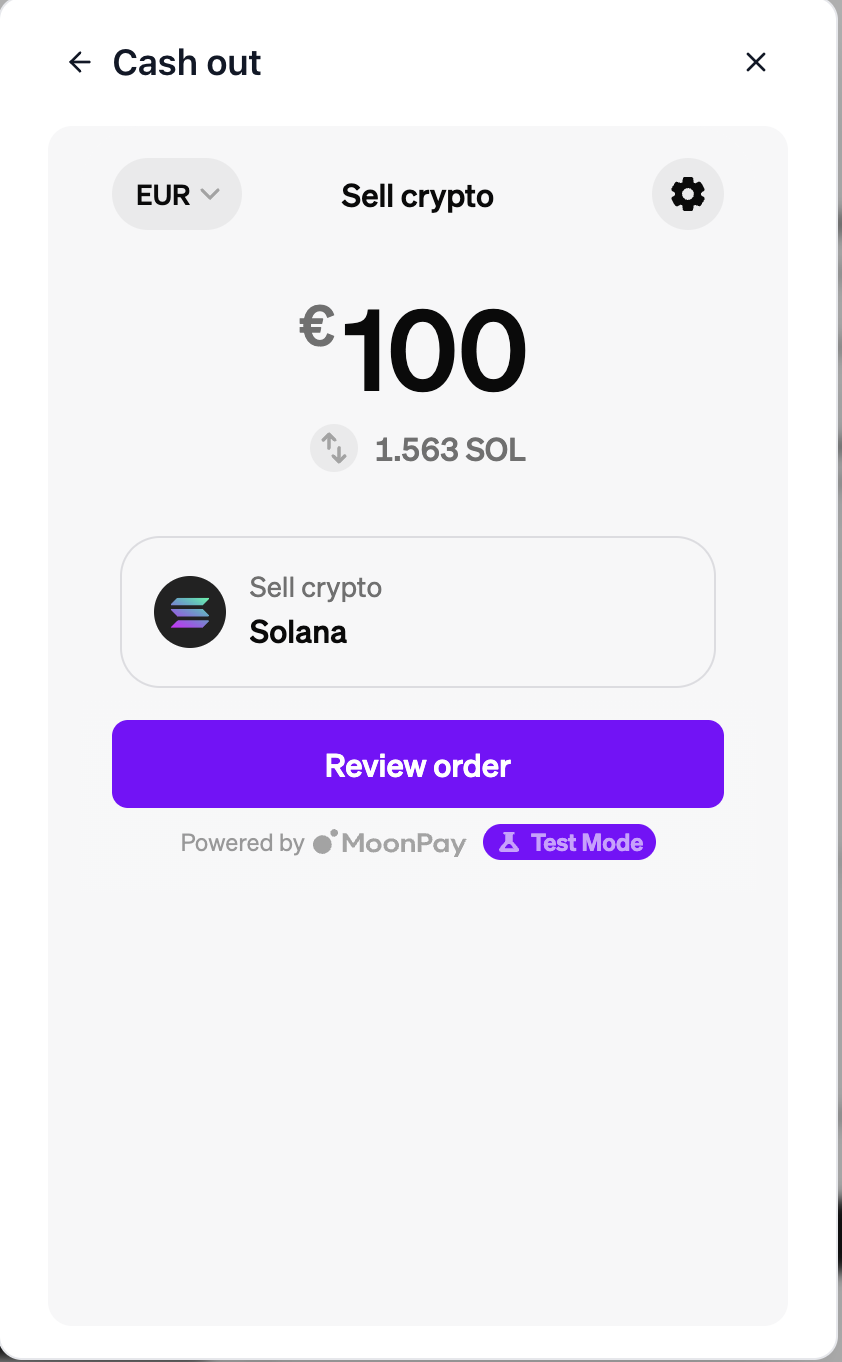
2. **Widget opens** - The MoonPay Sell widget opens inside the funding modal. The user picks the amount to sell and their payout method (card, bank transfer, etc.).
3. **Deposit confirmation** - When MoonPay requests the deposit, the wallet shows a first-party confirmation sheet with the exact asset, amount, and MoonPay deposit address. Nothing is sent until the user confirms.
4. **Wallet sends the deposit** - On confirmation the wallet builds, signs (with the user's passkey ceremony), and broadcasts the transfer to MoonPay's deposit address, and hands the transaction hash back to the widget.
5. **Payout** - MoonPay tracks the deposit on-chain and pays the fiat out to the user's chosen method. The widget shows progress until completion.
If the sell falls through after the deposit (for example a payout failure), MoonPay refunds the crypto to the user's wallet address; that is the `refundWalletAddress` MoonPay Wallets signs into every sell session.
## Supported assets
The React SDK's embedded cash-out flow currently automates deposits for **native currencies only**: ETH (or the chain's native token), SOL, and TRX. It locks the widget's sell currency to the native asset and builds the matching native transfer after the user confirms.
The Sell URL signing endpoint is not limited to native assets: direct integrations can provide another MoonPay `base_currency_code`, but they are responsible for implementing and validating the matching deposit flow. Asset availability also depends on the user's region and payout method. See [MoonPay's supported currencies](https://dev.moonpay.com/widget/supported-currencies).
## Integration
### React SDK
Use the `useCashOutWallet` hook to open the sell flow directly:
```tsx
import { useWallets, useCashOutWallet } from '@moon-x/react-sdk/ethereum';
function CashOutButton() {
const { wallets } = useWallets();
const { cashOutWallet } = useCashOutWallet();
const handleCashOut = async () => {
if (wallets.length === 0) return;
try {
await cashOutWallet(wallets[0].public_address, {
chain: { id: 1 },
});
} catch (error) {
console.error('Cash out failed:', error);
}
};
return ;
}
```
```tsx
import { useWallets, useCashOutWallet } from '@moon-x/react-sdk/solana';
function CashOutButton() {
const { wallets } = useWallets();
const { cashOutWallet } = useCashOutWallet();
const handleCashOut = async () => {
if (wallets.length === 0) return;
try {
await cashOutWallet(wallets[0].public_address, {
cluster: 'solana:mainnet',
});
} catch (error) {
console.error('Cash out failed:', error);
}
};
return ;
}
```
The user picks the amount inside the widget; there is no need to pass one.
Use `useCashOutWallet` to open Sell directly.
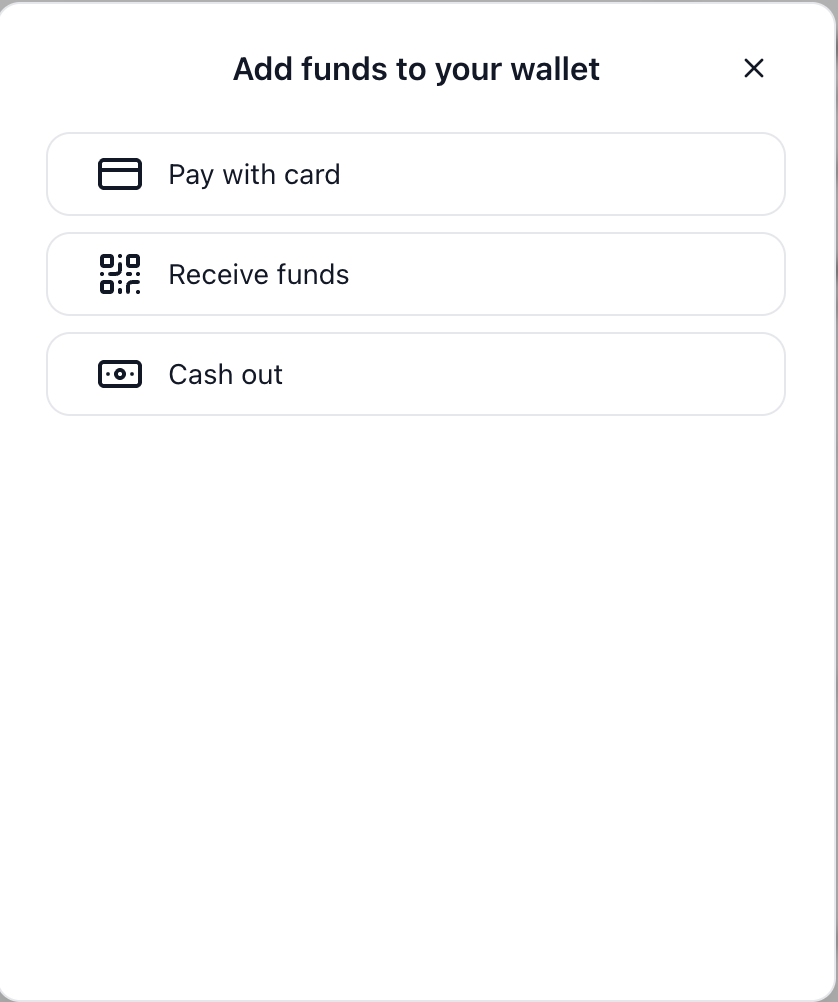
When Commerce is absent or disabled for the selected environment, `fundWallet` opens the [MoonPay Wallets funding window](/wallets/funding/overview#automatic-routing-with-fundwallet).
That window offers **Pay with card** when Buy is available, **Receive funds**, and **Cash out** when Sell is available.
Enabled Commerce opens its own native modal.
### Parameters
The wallet address to sell from. Must belong to the signed-in user; also used as the refund address.
The same funding configuration used by `fundWallet`: `chain` / `cluster` selects the network, and `useSandbox` routes through MoonPay's sandbox. The embedded React SDK flow uses the chain's native currency for cash out.
## Testing in sandbox
Pass `useSandbox: true` to run the sell against MoonPay's sandbox with your app's sandbox keys:
```tsx
await cashOutWallet(wallets[0].public_address, {
cluster: 'solana:devnet',
useSandbox: true,
});
```
Sandbox sells still perform a real deposit transaction on the test network (for example Solana devnet), so the wallet needs test funds to sell. No real fiat is paid out.
## Offramp sign endpoint
The React SDK calls this endpoint for you. If you drive cash out from your own backend, sign the Sell URL server-side: with `@moon-x/node-sdk` on Node, or the raw HTTP contract on any other stack.
### Node SDK
```ts
import { MoonXClient } from '@moon-x/node-sdk';
const moonx = new MoonXClient({
publishableKey: process.env.MOONX_PUBLISHABLE_KEY!,
});
const sell = await moonx.funding.signSell({
accessToken, // the end user's MoonPay Wallets access token
publicAddress: walletAddress, // must belong to that user; used as refund address
useSandbox: true, // omit or false for production
baseCurrencyCode: 'sol', // the crypto to sell (locks the widget currency)
baseCurrencyAmount: 1.5, // optional preset; omit to let the user choose
quoteCurrencyCode: 'usd', // optional fiat payout currency
});
// Open sell.signed_url for the user; sell.external_transaction_id
// correlates the sell (MoonPay's /v1/sell_transactions/ext/{id}).
```
Failures throw the same typed `MoonXError` subclasses as `funding.sign`: `IntegrationNotConfiguredError` (including "sell is not enabled for this app"), `WalletOwnershipError`, `UnauthorizedError`, and `RateLimitedError`.
### Raw HTTP
`POST /v0/sdk/offramps/public/moonpay/sign` returns a signed MoonPay Sell URL. Headers match the onramp route:
* `Authorization: PublicToken `
* `X-MoonX-Access-Token: `
```bash
curl -X POST "https://x-api.moonpay.com/v0/sdk/offramps/public/moonpay/sign" \
-H "Authorization: PublicToken moon_pk_test_your_api_key" \
-H "X-MoonX-Access-Token: EXAMPLE_ACCESS_TOKEN" \
-H "Content-Type: application/json" \
-d '{
"public_address": "0x0000000000000000000000000000000000000000",
"use_sandbox": true,
"config": {
"base_currency_code": "eth",
"quote_currency_code": "usd"
}
}'
```
```javascript
const response = await fetch(
'https://x-api.moonpay.com/v0/sdk/offramps/public/moonpay/sign',
{
method: 'POST',
headers: {
Authorization: `PublicToken ${publishableKey}`,
'X-MoonX-Access-Token': accessToken,
'Content-Type': 'application/json',
},
body: JSON.stringify({
public_address: walletAddress,
use_sandbox: true,
config: { base_currency_code: 'eth', quote_currency_code: 'usd' },
}),
}
);
```
The response has the same shape as the onramp sign route:
```json
{
"signed_url": "https://sell-sandbox.moonpay.com/?apiKey=pk_test_your_api_key&signature=EXAMPLE_SIGNATURE",
"url": "https://sell-sandbox.moonpay.com/?apiKey=pk_test_your_api_key",
"external_transaction_id": "EXAMPLE_TRANSACTION_ID",
"signature": "EXAMPLE_SIGNATURE",
"provider": "moonpay",
"provider_publishable_key": "pk_test_your_api_key"
}
```
### Request fields
The wallet address to sell from. Must belong to the signed-in user; sent to MoonPay as `refundWalletAddress`.
`true` signs against MoonPay's sandbox. Omitted or `false` signs against production.
Optional sell presets: `base_currency_code` (the crypto to sell, e.g. `"sol"`, also locks the widget's currency selector), `base_currency_amount` (number), `quote_currency_code` (fiat payout currency, e.g. `"usd"`), `payment_method` (string), and `ui_config` (`theme`: `"light"` or `"dark"`, and `accent_color`).
### Errors
| Status | Condition |
|--------|-----------|
| `400` | Sell is not enabled for the app (`moonpay sell is not enabled for this app`) |
| `400` | Funding is disabled for the app (`moonpay funding is disabled for this app`) |
| `400` | The requested environment has no keys (`moonpay production keys are not configured for this app`) |
| `400` | `public_address` is missing, or `config.ui_config.theme` is not `light`/`dark` |
| `403` | The wallet address does not belong to the signed-in user |
| `401` | Missing or invalid app key or access token |
| `429` | Rate limited (the public SDK surface is limited per IP in production) |
When you open the signed URL yourself (outside the embedded flow), the widget shows MoonPay's deposit instructions and the user sends the crypto manually; the automatic wallet-signed deposit only runs inside the MoonPay Wallets funding UI.
## Next steps
The on-ramp counterpart: buy crypto by card
Enable buy and sell for your app
 3. **Deposit confirmation** - When MoonPay requests the deposit, the wallet shows a first-party confirmation sheet with the exact asset, amount, and MoonPay deposit address. Nothing is sent until the user confirms.
4. **Wallet sends the deposit** - On confirmation the wallet builds, signs (with the user's passkey ceremony), and broadcasts the transfer to MoonPay's deposit address, and hands the transaction hash back to the widget.
5. **Payout** - MoonPay tracks the deposit on-chain and pays the fiat out to the user's chosen method. The widget shows progress until completion.
 ### Parameters