# Overview
Create embedded wallets inside your application for Ethereum/EVM, Solana, Tron, and Bitcoin. Wallets are created explicitly when a user needs one, not automatically at signup or login. Platform and operation support vary; use the [chain support guide](/wallets/chain-support) for the supported scope.
## Embedded wallets
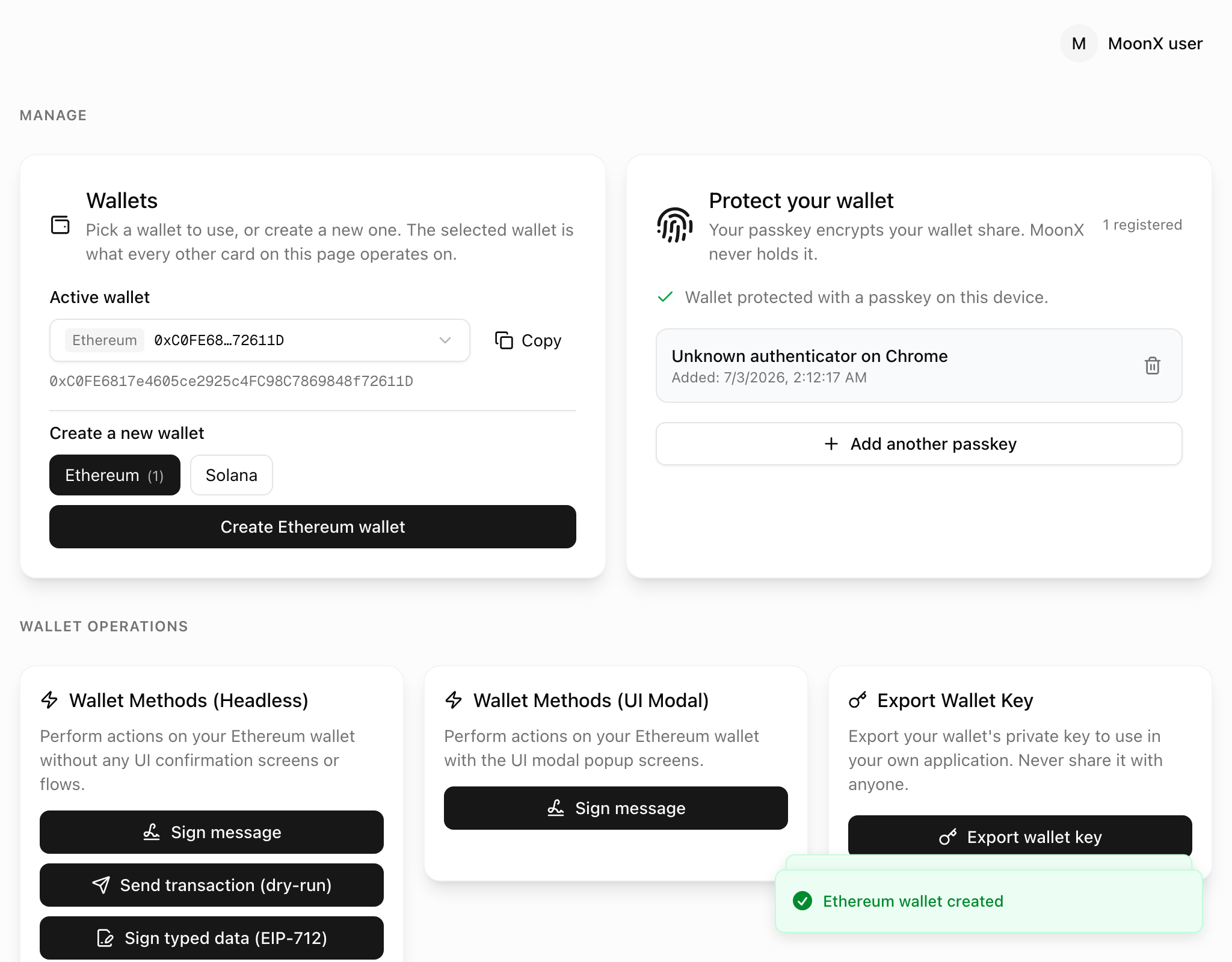
Authenticate the user, create or select a wallet, and pass that wallet to the appropriate chain-specific hook. Your app controls when wallet creation happens and which wallet is used for an operation.
### How it works
Standard signing uses **2-of-2 MPC** between the client and server-side shares. Both shares participate without assembling the full private key. Access to the client share depends on the wallet's passkey-only or identity-backed protection model.
Custody and recovery guarantees depend on the protection mode. Identity-backed wallets add a MoonPay-operated KMS access path; user-authorized delegated signing is a separate enclave flow. See [key custody](/security/key-custody) and [protection and recovery](/security/passkeys-and-recovery).
### Key features
Create a wallet only when your flow needs one, or select an existing wallet.
Choose chain-specific creation, signing, sending, and balance operations.
Support existing keys and user-initiated export, with chain-specific portability requirements.
Connect configured MoonPay funding, direct receiving, and cash-out flows.
Let a user authorize selected wallets for an expiring, revocable backend signer.
Build your own transaction and confirmation screens with the appropriate hooks.
## Wallet creation
The following examples target `@moon-x/react-sdk` **0.26.0**. Initialize [MoonXProvider](/get-started/frontend-sdks/react/setup), wait for SDK readiness and authentication, then create a wallet from a user action:
```tsx
import { useState } from 'react';
import { useMoonX } from '@moon-x/react-sdk';
import { useCreateWallet } from '@moon-x/react-sdk/ethereum';
export function CreateWalletButton() {
const { ready, isAuthenticated } = useMoonX();
const { createWallet } = useCreateWallet();
const [busy, setBusy] = useState(false);
const [message, setMessage] = useState('');
async function create() {
if (!ready || !isAuthenticated || busy) return;
setBusy(true);
try {
const { wallet } = await createWallet();
setMessage(`Wallet created: ${wallet.public_address}`);
} catch (error) {
setMessage(error instanceof Error ? error.message : 'Creation failed');
} finally {
setBusy(false);
}
}
return (
{message}
);
}
```
The result is `{ wallet }`; the raw wallet's address is `wallet.public_address`. `createWallet()` creates a new wallet. For a flow that only needs an existing-or-new wallet, SDK 0.26.0 exposes `useMoonX().findOrCreateWallet('ethereum')`, which also returns `{ wallet }`. See [wallet creation](/wallets/embedded-wallets/create-a-wallet/overview).
## User wallets
Use the chain-specific `useWallets()` hook to read wallets and its `loading` state. An authenticated user with an empty wallet list is a valid state. Present explicit creation or selection rather than treating sign-in as proof that a wallet exists.
Raw `PublicWallet` records contain `public_address` and `wallet_type`. Wallet clients/providers can expose additional chain-specific methods. Do not substitute an adapter's `address` or `publicKey` field for a raw wallet field without checking its type.
## Wallet operations
| Task | Guide |
| --- | --- |
| Sign a message | [Ethereum](/wallets/using-wallets/ethereum/sign-message), [Solana](/wallets/using-wallets/solana/sign-message), [Tron](/wallets/using-wallets/tron/sign-message), [Bitcoin](/wallets/using-wallets/bitcoin/sign-message) |
| Sign/send transactions | [Chain operations](/wallets/chain-support) |
| Read wallets | [Get user wallets](/wallets/embedded-wallets/get-a-wallet/get-user-connected-wallets) |
| Import keys | [Import a wallet](/wallets/embedded-wallets/import-a-wallet) |
| Export keys | [Export a wallet](/wallets/embedded-wallets/export-a-wallet) |
| Configure networks/RPCs | [Configure networks](/get-started/frontend-sdks/react/advance/configure-networks) and [RPC allowlist](/get-started/frontend-sdks/react/advance/csp-and-rpc-allowlist) |
For EVM sending, pass `{ transaction, wallet, chain }` to `sendTransaction` and read `{ hash }` from its result. A hash means submission, not successful execution. Wait for a receipt before a dependent step. Solana and Bitcoin use different payloads and result types; follow their chain guides.
## UI components
The web SDK provides configurable [signing and wallet UI](/wallets/ui-components/overview). With [headless wallet operations](/wallets/whitelabel/overview), your application owns review, confirmation, errors, and progress. React Native is headless and has [native signing hooks](/get-started/frontend-sdks/react-native/signing).
## Security and custody
The full key is not assembled during standard MPC signing. Import/export and exportable ed25519 generation handle the complete key in the user's client. A user-provisioned delegated signer reconstructs the key inside an attested enclave for that separate authorized flow.
Protection mode determines access and recovery behavior. Do not promise that login alone restores a passkey-only wallet, or that passkey-only custody guarantees apply unchanged to identity-backed wallets.
* [Key custody](/security/key-custody)
* [Passkeys and recovery](/security/passkeys-and-recovery)
* [Identity-backed encryption](/security/identity-backed-encryption)
* [Delegated signing](/security/delegated-signing)
## REST API
The REST API exposes supported backend operations and data lookups. Standard embedded wallet creation and signing involve the client SDK's MPC protocol; they are not single REST requests. Backend delegated signing requires prior user provisioning.
See [API overview](/get-started/rest-api/api-overview), [market data](/data/overview), and [swaps](/swaps/overview).
## Get started
Follow the [React quickstart](/get-started/frontend-sdks/react/quick-start) to reach a visible first signature, or use the [React Native quickstart](/get-started/frontend-sdks/react-native/quick-start). Then add [funding](/wallets/funding/overview), [transaction tracking](/recipes/wallets/multi-step-transaction-flow), or a [yield integration](/recipes/yield/overview).
 ## Embedded wallets
Authenticate the user, create or select a wallet, and pass that wallet to the appropriate chain-specific hook. Your app controls when wallet creation happens and which wallet is used for an operation.
### How it works
Standard signing uses **2-of-2 MPC** between the client and server-side shares. Both shares participate without assembling the full private key. Access to the client share depends on the wallet's passkey-only or identity-backed protection model.